
How to Start Selling on Amazon UK: Account, Plan, Approval and HMRC
 Max VershininFounder of Arbitrage Hero
amazon ukseller accountselling planshmrcgetting started
Ask AI to summarize this article:





To start selling on Amazon UK, you register one seller account, choose a selling plan and check which products you may sell before you buy stock. Amazon UK's seller registration guide asks for a government-issued ID, a proof of address, a credit or debit card and a bank account. Its pricing page lists the Individual plan at £0.75 per item sold and the Professional plan at £25 a month, both without VAT. For individuals, GOV.UK's trading allowance page says gross trading income over £1,000 in a tax year means you must register for Self Assessment.
The steps below quote Amazon UK's and GOV.UK's own pages, read on 20 November 2026. Arbitrage Hero, the sourcing software that publishes this guide, comes in at the sourcing step: it scans 176 UK stores against Amazon UK and shows the profit, fees and ROI of each match. This guide is not tax advice.
This guide adds the exact item count at which the Professional plan costs less in plan fees, and the documents Amazon asks for before it lets you sell a restricted product. Its tax sections separate Self Assessment from the reports that digital platforms send to HMRC.
What you need to start selling on Amazon UK
You need four things for an Amazon UK seller account: an ID, a proof of address, a payment card and a bank account. Amazon UK's seller registration guide lists them in its table of verification checks:
- A government-issued ID, such as a passport or a driving licence.
- A proof of address, such as a bank statement or a utility bill.
- A credit or debit card with its security code (CVV/CVC). Amazon accepts AMEX, Visa and Mastercard, but not prepaid cards or PayPal.
- A bank account, with its account number and sort code. If Amazon cannot verify it automatically, you upload a bank statement from the last 180 days.
A company also needs a business licence, such as a registration extract from the company register. The guide says individual sellers do not need one.
The form has six steps: business information, seller information, billing, store and product information, bank account, and identity verification. In the last step you take a photo of your face and of your ID, and Amazon checks them by biometric verification. Your phone number is verified by SMS or a call.
Amazon verifies your identity after you submit the registration details, and it may ask for more documents.
One registration also opens accounts in other Amazon stores. The guide calls it "a single, global seller registration", with linked accounts for the North American and European stores, among others. The Academy lesson on seller account registration goes through the form step by step.
Which selling plan should a new UK seller choose?
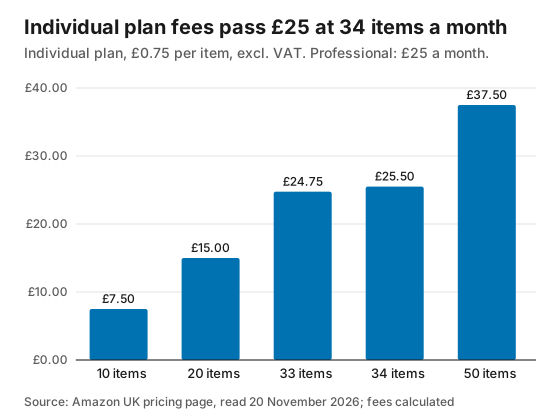
A new UK seller who expects to sell 34 or more items a month pays less in plan fees on the Professional plan, at Amazon UK's prices of 20 November 2026. On Amazon UK's pricing page, the Individual plan costs £0.75 per unit sold and the Professional plan £25 a month, both without VAT. On the Individual plan, 33 items cost £24.75 and 34 items cost £25.50, so the Professional fee is lower from the 34th item. The comparison covers the plan fees only, not the other selling fees.
Amazon's registration guide recommends the Individual plan for sellers of "fewer than 35 items a month" who are still deciding what to sell or do not plan to use advanced selling tools.
Calculated as items sold x £0.75, the Individual plan fees are £7.50 at 10 items a month, £15.00 at 20, £24.75 at 33, £25.50 at 34 and £37.50 at 50. The Professional fee is £25 a month. These figures use Amazon UK's prices of 20 November 2026 and exclude VAT and all other selling fees.
| Items sold a month | Individual plan fee | Professional plan fee |
|---|---|---|
| 10 | £7.50 | £25.00 |
| 20 | £15.00 | £25.00 |
| 33 | £24.75 | £25.00 |
| 34 | £25.50 | £25.00 |
| 50 | £37.50 | £25.00 |
The plans also differ in what they allow. In the plan table of Amazon UK's pricing page, "You want to sell products in restricted categories" is listed only for the Professional plan. The registration guide also points sellers who want advanced selling and advertising tools to the Professional plan.
Three rules in Amazon's registration guide decide what you pay each month:
- The first Professional fee is charged when registration is complete and your information is verified. After that, the fee is charged each month with active listings: "If you do not have active listings, you will not be charged a subscription fee in that month."
- You can change or cancel your plan at any time in Seller Central after verification.
- If you sell in other stores too, such as Amazon.com through the linked US account, you pay "the equivalent of 39.99 USD per month", split across the countries or regions where you have active listings.
Check which products you may sell before you buy stock
Check each product's selling status in Seller Central before you buy it, because some products need Amazon's approval first. Amazon's help page Categories and products that require approval, for the UK store, says to search for the product in Add Products and read its status:
- "Sell this product": no approval needed.
- "Apply to sell": approval required.
- "Not available": the product cannot be listed.
The same page says a restriction can apply to one ASIN, a brand, a brand within a category, a category or a subcategory. The page adds: "Some products require multiple approvals."
To apply, you click Apply to sell, fill in the form and upload documents. The page lists purchase invoices dated within 180 days, clear photos of all sides of the product, and brand authorisation letters or safety certificates where they are needed. The review takes 2 to 7 business days. If a product says "Apply to sell" and the application needs purchase invoices, find out first whether your supplier gives invoices that meet these requirements, and do not buy a large quantity while the approval is open. If the answer is "Your account does not qualify", the page says the decision cannot be appealed.
The Academy lesson on gated categories and the ungating process covers the application in more detail. Our guide to how to resell on Amazon covers the purchase records a reseller should keep.
Choose who ships your orders: FBA or your own shipping
You choose for each product whether Amazon ships it (Fulfilment by Amazon, FBA) or you store, pack and ship it yourself (Fulfilment by Merchant, FBM). Amazon UK's registration guide says FBA "handles storage, packing, shipping, returns, and customer service", and that most sellers use it. Amazon UK's pricing page says the cost to ship your orders "depends on whether you fulfil your own orders or use Fulfilment by Amazon (FBA)". Both methods pay a referral fee on each item sold. The same page says most referral fees are between 8% and 15% of the total sales price, which includes the item price and any delivery or gift wrapping charges, depending on the product category.
Our comparison FBA or FBM: the cost per unit works through both methods. For the UK fee figures, read Amazon FBA fees in the UK.
Where resellers buy products to sell on Amazon UK
Resellers buy stock from UK retail stores and wholesale suppliers when the Amazon UK price leaves a profit after the buy price, Amazon's fees and their other costs.
Arbitrage Hero does this comparison for 176 UK stores, among them Argos, Boots, Currys, John Lewis & Partners, Hamleys and The Works. It matches each store product to its Amazon UK listing, mainly by barcode, with title matching as a fallback. It calculates the profit from the store's buy price, the Amazon sell price and Amazon's fees for that product, and each result shows Keepa price and sales-rank charts. The profit is a calculation from those inputs, so add any other costs you have, such as sending stock to Amazon. Arbitrage Hero works with Amazon US and Amazon UK only.
A first check of one product can follow these steps:
- Pick a matched product from a UK store in Arbitrage Hero and open its Amazon UK listing.
- Check that the listing is the same product, in the same pack size and variant as the store product.
- Read the Keepa price and sales-rank charts of the listing.
- Search the product in Add Products in Seller Central and check that it says "Sell this product".
- Check the profit after Amazon's fees before you buy.
Our guide to online arbitrage in the UK lists the UK stores with the most products matched to Amazon. It also explains VAT for sellers based in the UK and outside it.
When must an individual Amazon seller register for Self Assessment?
An individual who resells on Amazon UK must register for Self Assessment when gross trading income from all their trades goes over £1,000 in a tax year, before any expenses are taken off, according to GOV.UK's trading allowance guidance. If you buy products to resell, HMRC is likely to treat you as trading. GOV.UK's guidance Selling goods or services on a digital platform says: "If you buy or make goods to sell at a profit, you're likely to be trading and will have to pay tax on your profits."
GOV.UK's page on tax-free allowances on property and trading income gives individuals a trading allowance of up to £1,000 a year, counted over one or more trades. With gross trading income over £1,000, the page says an individual must register for Self Assessment. Gross income is the total before any expenses. For example, 100 units sold at £12.00 each are £1,200 of gross trading income. That is over £1,000, whatever the profit after the cost of the stock and Amazon's fees.
VAT is a separate registration with its own rules. Our UK online arbitrage guide explains them, with the GOV.UK sources.
What to do next
To start selling on Amazon UK, prepare your account documents, check each product before you buy stock, and keep records of sales and costs from the first day.
- Get your documents ready: a passport or driving licence, a recent bank statement or utility bill, a Visa, Mastercard or AMEX card, and your bank account number and sort code.
- Register at sell.amazon.co.uk and complete Amazon's identity checks.
- Choose the Professional plan if you expect to sell 34 or more items a month (its plan fee is then lower) or want restricted products; otherwise start on the Individual plan and switch later.
- Before each purchase, search the product in Add Products and check that it says "Sell this product". Keep every purchase invoice.
- Decide between FBA and your own shipping for each product, with the fees in front of you.
- Keep records of your sales and costs from the first day. If you sell as an individual, register for Self Assessment once your gross trading income from all your trades passes £1,000 in a tax year.
Do you need a limited company to sell on Amazon UK?
No, you do not need a limited company to sell on Amazon UK. Amazon UK's seller registration guide has a business type for individuals without a registered business, which "includes sole traders or self-employed individuals". Individual sellers do not provide a business licence, but they provide a proof of address.
How long does Amazon UK seller verification take?
Amazon UK seller verification usually takes three business days or less, according to Amazon UK's seller registration guide. The guide says identity verification "usually takes three business days or less", and in its identity step: "Most verifications are completed within 48 hours." Neither is a guarantee, so the three-business-day estimate is the safer one for planning. In many cases, the registration form itself takes just a few hours. Amazon sends email updates during the check, and it says what to provide if it needs another document.
Do online marketplaces report your sales to HMRC?
Yes, digital platform operators in the UK report their sellers' details and income to HMRC, under rules that started on 1 January 2024, according to GOV.UK's guidance Selling goods or services on a digital platform. A seller with fewer than 30 sales of goods and less than 2,000 euros (about £1,700) for them in a calendar year is not reported, and a report "does not automatically mean you owe tax". GOV.UK defines a digital platform as "any software, including mobile apps and websites, which allows you to offer services and goods to users".
Operators report each calendar year by 31 January of the next year, and the platform must give you a copy of what it reported.