
The Modern Online Arbitrage Stack: Six Jobs, and How Many Tools It Takes
 Max VershininFounder of Arbitrage Hero
online arbitragesourcing toolsamazon fbasoftware stack
Ask AI to summarize this article:





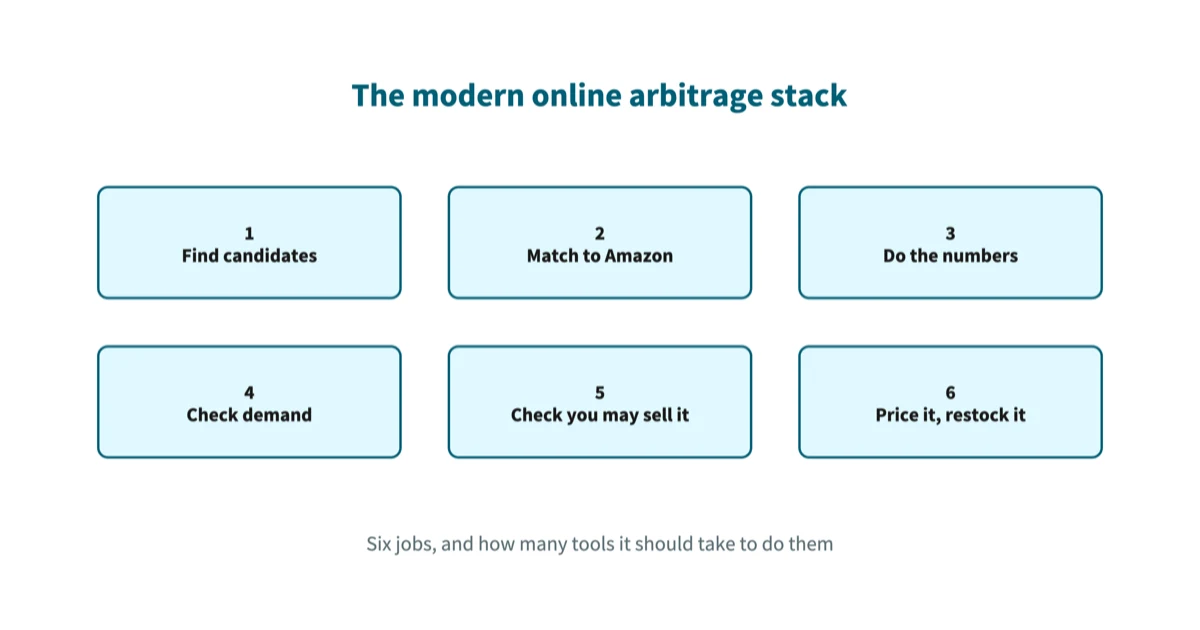
Short answer: a modern online arbitrage stack does six jobs. Find candidate products, match them to the right Amazon listing, work out the profit after Amazon's fees, check the product actually sells, check you are allowed to sell it, then price and restock what you bought. These used to be sold separately, so covering them meant several subscriptions and a spreadsheet to join them together. One subscription can now carry the software side of all six, which turns the useful question from "which tool" into "where are the joins, and who is checking them".
Most tool comparisons answer a smaller question than the one people are asking. They compare feature lists. What a seller actually needs to know is which jobs have to get done at all, which ones software can take over, and which ones stay with them no matter what they buy.
This article lays the stack out job by job. It says what each job decides, what goes wrong when it is done badly, and where Arbitrage Hero fits. Where a number appears, it comes from our own published data or from the store list this site renders.
A stack is six jobs, not six tools
Start with the jobs. Tools change every year. The jobs are set by how Amazon works, so they change far more slowly.
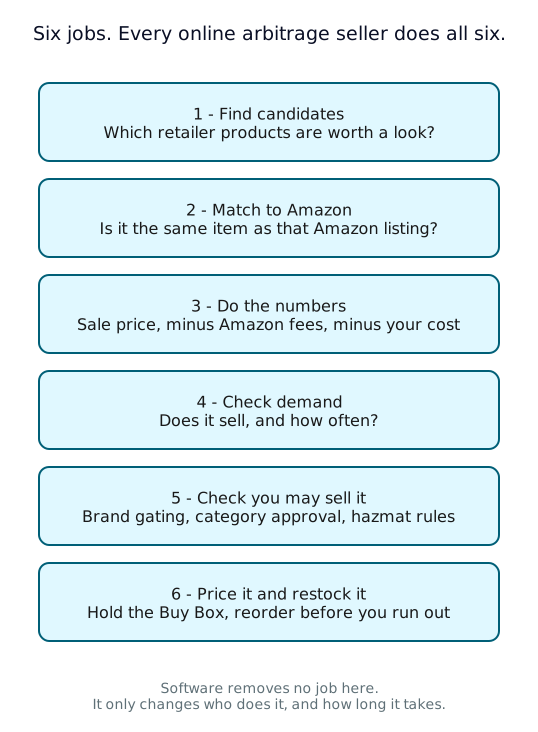
Every seller does all six. Someone with a spreadsheet does them by hand, one product at a time. Someone with a full stack has the first four done for them in bulk and spends the evening on the last two. The work is the same work. What changes is how many products you can put through it.
That is worth saying plainly because it sets the standard for judging any tool. A tool that does job 1 brilliantly and leaves you to do jobs 2 to 6 by hand has not saved you an evening. It has only changed which part of it you spend.
What each job actually decides
Each job has one question it answers and one way it fails.
- 1. Find candidates. Which retailer products are worth looking at? It fails by being too narrow. If your tool only covers eight stores, your competition is everyone else scanning those same eight stores.
- 2. Match to Amazon. Is this retailer product the same item as that Amazon listing? It fails quietly and it is the most expensive failure in the stack. A wrong match produces a deal that looks excellent and does not exist, because the two prices belong to two different products. A barcode match is the lower-risk one, though it can still put you on the wrong listing when the pack size differs. A title match is a fallback and always needs a second look.
- 3. Do the numbers. What is left after Amazon takes its cut? It fails by leaving costs out. Referral, fulfilment and closing fees are the ones software knows. Your prep, your inbound shipping and your sales tax are the ones it usually does not.
- 4. Check demand. Does the product sell, and how often? It fails by treating a good price as a good deal. A product with a 40% return that sells twice a year ties your money up in unsold stock.
- 5. Check you may sell it. Are you approved for the brand, the category, the condition? It fails after you have paid. Restrictions are account-specific, so a product another seller can list may be closed to you.
- 6. Price it and restock it. Can you hold the Buy Box, and do you know your real margin? It fails through cost data. A repricer that does not know what you paid can only guess at your floor price.
A scan is a chain of filters, and you set the last three
Jobs 1 to 4 usually arrive as one thing: a store scan. It is worth understanding as a chain of filters rather than a search, because that explains why two sellers running the same scan get different answers.

The blue filters are mechanical. Matching a product to a listing and taking Amazon's fees off a price are arithmetic, and a tool either does them correctly or does not. The amber filters are judgement, and they belong to you. Nobody else can set your ROI floor, because nobody else knows your prep costs or how long you are willing to hold stock.
The ROI floor is the one people set wrong most often, and they set it too low. A low floor does not find you more deals. It buries the good ones. We looked at this across our own US matching data in a separate article on category margins, and the gap between "makes a profit" and "makes a profit worth having" is wide:
| Amazon category | Deals that make any profit | Deals clearing 30% ROI |
|---|---|---|
| Clothing, Shoes and Jewelry | 74% | 21% |
| Sports and Outdoors | 85% | 21% |
| Arts, Crafts and Sewing | 91% | 39% |
| Industrial and Scientific | 89% | 48% |
Read the Sports and Outdoors row again. 85% of its matches make some profit, which is one of the best figures we measure, and only 21% of them clear a 30% return. A scan filtered on "profitable" returns a long list from that category and almost none of it is worth the shipping. The filter did its job. The floor was in the wrong place.
The size of the catalogue is what makes the floor matter. Arbitrage Hero currently covers 430 US and UK stores holding more than 500 million products. Against a catalogue that size, a floor set slightly too low does not add a few rows to your results. It adds more than you can read.
The old stack was assembled from parts, and the joins cost you
The stack used to be assembled from parts because the parts arrived separately. A bulk scanner for job 1. A price-history add-on for job 4. A repricer for job 6, on its own bill. An inventory or bookkeeping tool for cost of goods. Then a spreadsheet to hold the parts that none of them covered.
Each of those tools is defensible on its own. The cost is not in any one of them, it is in the joins between them, and it shows up in three ways.
- Your cost data lives in three places. The scanner knows the retailer price. The inventory tool knows what you actually paid after a coupon and shipping. The repricer knows neither, so its floor price is set from a number somebody typed in months ago.
- The tools disagree, and you find out late. Two tools calculating Amazon fees from different data will report different profit on the same product. You usually discover which one was right after the stock has landed.
- The joins are manual, so they fall out of date. A CSV export that a person has to remember to run is a step that gets skipped in a busy week, and nothing warns you that it was skipped.
This is why the modern answer is consolidation rather than a better spreadsheet. When the scan, the eligibility check, the repricer and the cost of goods all read the same record, the joins stop being your job. If you want the version of this argument that names specific products, the comparisons are here: Arbitrage Hero and Tactical Arbitrage and the wider tool roundup.
Where Arbitrage Hero sits on the stack
Here is the same six jobs, mapped onto what one subscription covers and what it does not.
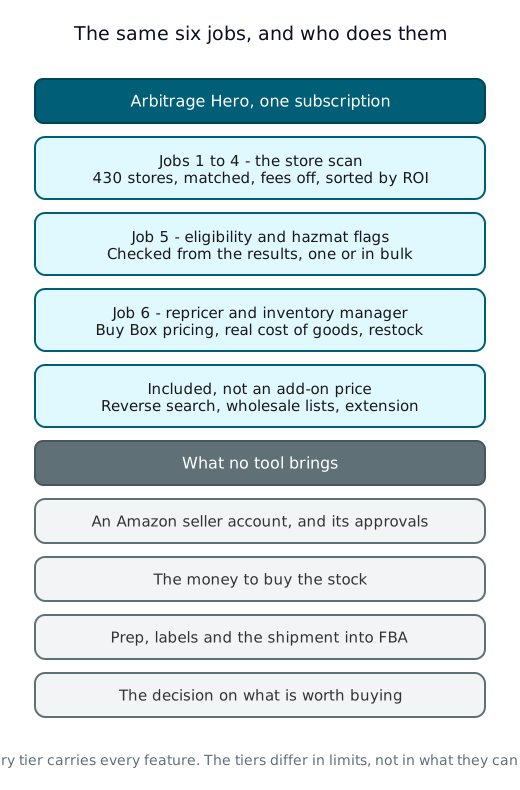
The pieces, and the job each one does:
- Online arbitrage search covers jobs 1 to 4. It scans the supported stores, matches products to Amazon listings by barcode first and by title as a fallback, takes Amazon's fees off, and sorts what is left by ROI, with price and sales-rank history on each result.
- Reverse search is the same work from the other end. You start from an ASIN or a competitor's storefront and it looks for the retailers selling that product for less. Useful when you already know what you want to sell.
- Wholesale sourcing does jobs 2 to 4 on a supplier price list instead of a store catalogue. You upload the file, every line gets matched to a listing, and you get the same profit and ROI columns back.
- Eligibility and hazmat checks do most of job 5. They run from the results on a single product or in bulk, so the products you clearly cannot sell are removed before you buy rather than after. Approvals that are specific to your account still have to be confirmed in Seller Central.
- The repricer and inventory manager cover job 6. The repricer is included in the subscription rather than priced as an add-on. The inventory manager tracks cost of goods on a first-in-first-out basis, so the profit it reports is worked out from what you actually paid rather than from the retailer's shelf price.
- The Chrome extension puts the same numbers on Amazon and retailer pages while you browse, for the checks you do by hand.
- The FBA calculator is free and needs no account, for US and UK, if all you want is to check one product's fees.
Two things about how this is sold, because they change how you should read the list. Every plan includes every feature and the plans differ in limits rather than in capability, so you are not assembling a stack out of tiers; the limits are on the pricing page. And there is an API if you would rather pull the product analysis into something you have built yourself.
What no tool does for you
The grey half of that diagram is the honest part, and it is the part most software pages leave out.
Software cannot get you approved to sell a brand. It cannot pay for the stock. It will not prep, label and ship your shipment into FBA. Most importantly, it does not decide what to buy. It narrows more than five hundred million products down to a list you can read in a few minutes, and then a person has to look at that list and take a position with their own money.
That last point sounds obvious and it is the one that catches people. A shortlist is not a recommendation. Every row on it passed your filters, which means every row is only as sensible as the filters were.
How to assemble your own stack
- Write down the six jobs and name what does each one today. If the answer for any job is "me, by hand, when I remember", that is your first gap. It is usually job 5 or job 6.
- Count your subscriptions and count your joins. For every pair of tools that do not share data automatically, something has to carry it across, and that something is usually you. Each join is a place where your numbers can quietly disagree.
- Set your ROI floor from your own costs, not from a forum. Take your prep cost per unit and your inbound shipping, add a margin for a fee correction or a return, and put the floor above that. 30% is the bar we use when we measure categories, but your floor should come out of your own arithmetic.
- Set a minimum profit in money as well as a percentage. A 60% return on a cheap item is still a small amount of money and it costs the same to prep as an expensive one.
- Check restrictions before you buy, in bulk. Restriction checking done one product at a time is restriction checking that gets skipped.
- Make the repricer read your real cost of goods. A floor price built on a guessed cost is the most expensive setting in the stack.
- Verify the first few matches by hand. Open the Amazon listing, look at the retailer page, confirm they are the same item and the same pack size. Do this for the first several deals from any store you have not bought from before, and again whenever you start buying a different kind of product.
Frequently asked questions
What is an online arbitrage stack?
It is the set of tools that between them do the six jobs of online arbitrage: finding candidate products, matching them to Amazon listings, calculating profit after Amazon's fees, checking demand, checking your selling restrictions, and pricing and restocking what you buy. The word "stack" is borrowed from software, where it means the layers a system is built from. A stack can be one subscription that covers all six jobs, or five tools that cover one or two each with you moving data between them.
Do I need separate tools for sourcing, repricing and inventory?
Not any more, and there is a specific reason to prefer one tool over three. The three jobs share the same data. The repricer needs the cost of goods that the inventory tool holds, and the inventory tool needs the purchase that the sourcing tool found. When they are separate products, you are the integration, and the number that goes stale first is your true cost. Arbitrage Hero includes the repricer and the inventory manager in the same subscription as the sourcing search for that reason.
What is the difference between online arbitrage and wholesale sourcing?
The difference is where the product list comes from, not what happens to it. In online arbitrage the list is a retail store's public catalogue and you buy at the price any shopper would pay. In wholesale you have an account with a supplier and the list arrives as a price file, usually a spreadsheet with thousands of lines. Jobs 2 to 6 are identical in both cases: the lines still have to be matched to Amazon listings, costed, checked for demand and restrictions, then priced and restocked. That is why price-list matching sits in the same tool as the store scan.
How many stores does a sourcing tool need to cover?
More than the obvious ones, because the obvious ones are where everyone else is looking. Coverage matters less as a headline number than as a question of overlap: if your tool covers the same eight large retailers as everybody else's, you are competing for the same deals on the same day. Arbitrage Hero covers 430 US and UK stores holding more than 500 million products, and the full list is published on the supported stores page so you can check whether the retailers you care about are on it before you subscribe.
Does a sourcing tool tell me if I am allowed to sell a product?
It can tell you whether the product is restricted in general and flag hazmat items, and a good one lets you check eligibility in bulk straight from the search results. What no tool can do reliably is answer the question for your specific account, because brand and category approvals are granted per seller. Treat an eligibility check as a strong filter that removes the products that are restricted in general, and confirm anything you are about to spend real money on inside Seller Central.
Is a Chrome extension enough on its own?
Only for jobs 2 to 5, and only one product at a time. An extension is the right tool when you are already looking at a page and want the numbers for that item, which makes it excellent for checking a deal somebody sent you or verifying a match before you buy. It cannot do job 1 at any useful scale, because you would have to visit every product page yourself. The normal pattern is a bulk scan to build the shortlist and the extension to verify what is on it.
Keep reading
- Where Amazon Arbitrage Margins Are Thinnest - the category data behind the ROI floor advice above.
- How to Find Profitable Online Arbitrage Deals in 3 Minutes - jobs 1 to 5 as a worked session.
- How to Do Reverse Sourcing the Right Way - the same stack, starting from the ASIN.
- 10 Beginner Mistakes in Online Arbitrage - the fee and pack-size traps that break job 3.
- How to Choose Replenishable Amazon Products - turning job 6 into repeat purchases.